ASO App Store: the complete guide to ranking your app on the App Store in 2026
65% of App Store downloads start with a search. ASO covers keyword ranking and listing conversion, screenshots included.

Article summary
- 65% of App Store downloads follow a search, according to Apple.
- The App Store has more than 2 million apps, and 14,700 new apps are published every month.
- The title, the subtitle, and the keywords field are indexed; the App Store description is not.
- Since June 2025, Apple indexes the text of screenshot captions.
- 90% of featured apps have a rating of at least 4.0, and Apple limits review requests to 3 per year.
Summarize this article with
65% of App Store downloads start with a search. If your app does not appear when someone searches for what it does, you are invisible. firstapp explains how ASO works in 2026, and how to use it to generate organic downloads without spending a cent on advertising.
What ASO is and why it is essential
ASO (App Store Optimization) is the SEO of the App Store. It is the set of optimizations that let your app appear in App Store search results, and convince users to download it once they have found it.
In 2026, the App Store has more than 2 million apps. Every month, 14,700 new apps are published. Without ASO, your app is a needle in a haystack of 2 million needles. With ASO done well, it becomes visible to the people who are looking for exactly what it does.
65% of App Store downloads follow a search, source Apple. ASO is the most cost-effective acquisition channel for a mobile app. Unlike advertising, a good optimization keeps generating downloads for months after it is put in place.
What makes ASO particularly powerful: it attracts high-intent users. Someone who types "nutrition tracking app" into the App Store knows exactly what they are looking for. They are infinitely more qualified than a user who sees an ad while scrolling Instagram.
Newsletter
Once a week.
Last issue
We opened 10 apps to see how they sell a subscription.
+534 people read us each week
The two pillars of ASO
ASO solves two distinct problems that should not be confused:
1. Visibility, making the App Store algorithm understand which queries should show your app. That is the work of keywords, the title, the subtitle, and the keywords field. The algorithm has to "understand" your app.
2. Conversion, convincing a user who lands on your listing to download the app. That is the work of screenshots, the icon, the description, reviews, and the rating. The user has 5 to 10 seconds to decide.
Many founders work on one without the other. A well-ranked app that does not convert wastes its visibility. An app that converts well but is not found generates downloads only from paid traffic. Both pillars have to be optimized together.
And since 2025-2026, a third signal has grown in importance: retention. The App Store algorithm is starting to reward apps whose users come back. An app with strong D7 retention can outrank competitors that have more downloads but less engagement. Which means your onboarding and your product are now part of your ASO strategy.
The App Store metadata fields, which one counts the most
On the App Store, each field of your listing has a different weight in the algorithm. Here is what you need to know about each one.
Title (App Name) - 30 characters max
This is the most important field for ranking. Keywords in the title have the strongest impact on your position. The formula that works: brand name + a descriptor with the main keyword. Example: "Calyra (ex-Nutria) - Calorie tracker" rather than just "Calyra (ex-Nutria)". Do not waste these 30 characters on your brand name alone. Users who do not know you yet need to understand what you do.
Subtitle - 30 characters max
The subtitle is indexed by the algorithm and visible directly under the title in search results. It is the place to put your second and third most important keywords, as a short, readable phrase. Do not repeat the title's keywords. The algorithm does not reward repetition, and you lose coverage area.
Keywords field - 100 characters max
This is your hidden keyword field, visible only to Apple, never to users. Absolute rules: separate words with commas and no space, do not use spaces between the words of the same phrase (the engine handles them), never repeat a keyword already present in the title or the subtitle, and never include a competitor's name (a violation of Apple's guidelines). 100 characters = gold. Do not waste a single character.
Description - 4,000 characters max
Unlike Google Play, the App Store description is NOT indexed by the algorithm. It does not serve ranking. It serves to convert users who click "Learn more". Write it for the human, not for a robot. The first 3 lines are visible without a click. That is where you place your main value proposition. The rest can detail the features.
Promotional text - 170 characters max
The only field you can change without submitting a new version of the app. It appears above the description. Use it for news, seasonal promotions, or new features. Not indexed, but visible immediately on your listing.
The golden rule of App Store keywords: never repeat a keyword across the title, the subtitle, and the keywords field. Each repetition is wasted space. The algorithm understands combinations. You can rank for "nutrition tracking" if "tracking" is in the title and "nutrition" is in the keywords, without repeating both words together.
Keyword research, the basis of everything
Choosing the wrong keywords means optimizing for queries nobody types, or for queries too competitive for you to rank. Keyword research is the foundation of your whole ASO strategy.
The 4-step method
1. Initial brainstorm. List every term that describes what your app does, from the user's point of view, not the developer's. "Lose weight" rather than "macronutrient tracking". Look for the intent, not the feature.
2. Competitor analysis. Look at the titles and subtitles of your 5 main competitors. Which keywords do they use? Which keywords did they miss? That is often where the best opportunities are.
3. Volume versus competition. You want keywords with good search volume AND manageable competition. A heavily searched keyword dominated by apps with thousands of reviews is worth nothing for a new app. Target more specific long-tail keywords, "beginner meditation app" rather than "meditation".
4. Continuous iteration. Your first keyword selection is not final. After 2 to 3 weeks, look at your rankings. Which keywords bring you impressions? On which ones can you move up? ASO is a continuous process, not a one-time optimization.
Long-tail vs short-tail
In 2026, the trend is clearly toward long-tail queries: more specific, less competitive, and more qualified. "Remove photo background" converts better than "photo editor" because the user knows exactly what they want. Aim for phrases of 2 to 4 words that precisely describe your main use case.
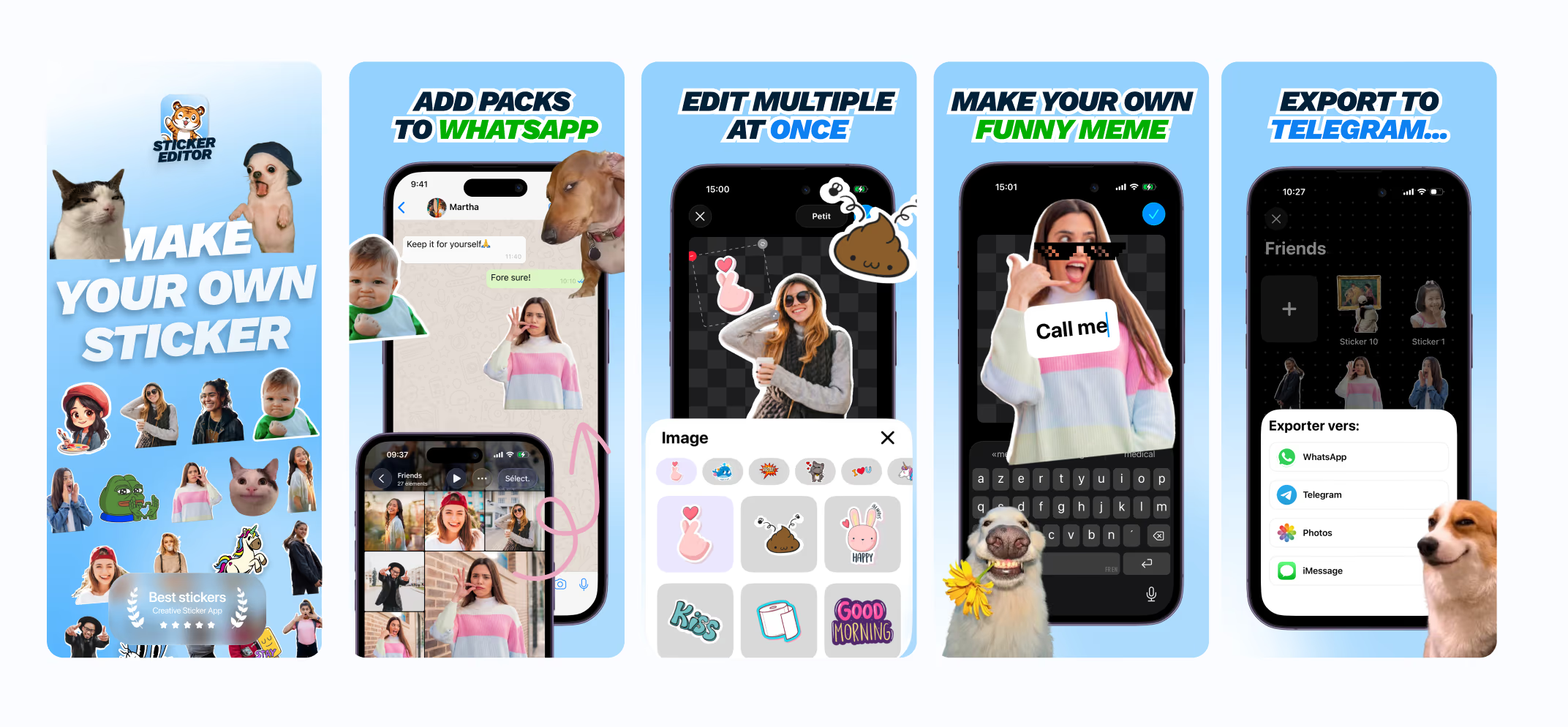
By refocusing Sticker Editor keywords on precise long-tail queries, "create custom sticker", "make WhatsApp sticker", rather than generic terms like "sticker app", organic download volume rose significantly. Users who arrived through these precise queries had a clear intent, and converted better.
Visuals, screenshots, icon, preview
Visuals are the most impactful conversion lever on your App Store listing. A user spends 5 to 10 seconds on your listing before deciding. In that time, they will look at the icon, the screenshots, and possibly the rating. Not the description.
Screenshots, your visual sales argument
Screenshots should not show screenshots of the app. They should sell the benefit. The difference is fundamental. Not "here is our app's interface", but "here is what you are going to get".
1. The first screenshot is decisive. It is the only one visible without scrolling in search results. It has to communicate your main value proposition in a fraction of a second. Short text, strong visual.
2. Prefer portrait format. Portrait screenshots take more space in search results than landscape ones. More visibility = more clicks.
3. Add captions on every screenshot. Since June 2025, Apple indexes screenshot caption text for ranking. It is a new opportunity to place keywords with a visual and algorithmic impact at the same time.
4. Test via Product Page Optimization. Apple offers native A/B testing of visuals directly in App Store Connect: icon, screenshots, video preview. It is one of the ASO tests with the best ROI.
By refocusing Sticker Editor's screenshots on the final result, "here is the sticker you are going to create" rather than "here is the interface", the App Store listing conversion rate increased by +20%. Nothing changed in the app. Only the way it was presented.
The icon, your visual identity in 1024px
The icon is the first visual contact with your app, in search results, in suggestions, and on the user's home screen. It has to be recognizable at any size, distinct from your competitors, and ideally tested in several versions via A/B testing.
The best-performing apps have simple icons, one strong graphic element on a contrasting color background. Stay away from complexity.
The video preview
A well-made video preview can increase your conversion significantly, if it shows the app's main value in under 15 seconds, without sound (many users scroll with no sound), and without turning into a tutorial. If you do not have the resources for a quality video, do not make a video. A bad video preview is worse than no video.
Reviews and the rating, the most underestimated lever
90% of apps featured on the App Store have a rating ≥ 4.0 stars. That is not chance. It is an explicit Apple criterion for featuring. And beyond featuring, the rating directly impacts your conversion rate: an extra half star can increase downloads by 25% according to AppFollow.
Getting reviews at the right moment
The timing of the review request is everything. Apple allows 3 review requests per year via SKStoreReviewController. Each request therefore has to be placed at the precise moment the user has just gotten value, after their first aha moment, after having completed a goal, or after spontaneous positive feedback in the app.
Never ask for a review when the app opens, after a bug, or before the user has had time to understand your app's value. A badly timed review request generates negative reviews, and you have wasted one of your 3 annual requests.
Replying to reviews, an underestimated ASO weapon
Apple notifies the author of a review when you reply. A user who receives a personalized, useful reply to their negative review often comes back to change their rating. Replying to reviews, positive and negative, within 48 hours is one of the most profitable ASO actions for the time invested.
Advanced App Store features
Product Page Optimization, native A/B testing
Apple offers native A/B testing directly in App Store Connect. You can test up to 3 variants of your visuals (icon, screenshots, video preview) on a percentage of your traffic. It is one of the most impactful and easiest tests to set up. If you have not turned this feature on yet, it is your first ASO priority after keyword optimization.
Custom Product Pages, a new organic lever since 2025
Since July 2025, Apple has integrated Custom Product Pages into organic search results. They no longer appear only through paid campaigns. You can create up to 70 different product pages, each optimized for a keyword or a specific audience segment. It is a major change: you can now have a dedicated page "meditation app for beginners" and another "meditation app for sleep", with different screenshots and a different message for each.
In-App Events
In-App Events are events you can publish directly on your App Store listing: new features, challenges, seasonal events. They appear in search results and can generate reinstalls from former users. In 2026, reinstalls exceed new installs by 2x on the App Store. In-App Events are a powerful re-engagement tool.
The essential ASO tools
The reference for keyword research and competitive analysis. Reliable data, a clear interface. Our base tool for every client ASO project.
Estimates of competitors' download volume, market analysis, ranking tracking. Excellent for benchmarking your position in your category.
Review monitoring and automated replies. Rating tracking over time. Essential for apps with a large review volume.
The classic ASO mistakes
Repeating the same keywords in the title, the subtitle, and the keywords field. Each repetition is waste. The algorithm understands combinations. Cover the maximum number of possible queries with your 160 indexed characters.
Never updating your keywords. The market moves. Search trends evolve. Competitors change their strategy. A frozen ASO is an ASO that regresses. Reassess your keywords every 2 to 3 months.
Treating ASO as a one-time task at launch. ASO is a continuous process. Every app update is an opportunity to refresh your keywords, your screenshots, and your promotional text.
Ignoring the listing conversion rate. Ranking without converting is useless. If your app appears in the results but users do not click, or they click but do not download, it is a visuals or positioning problem.
Not taking advantage of Product Page Optimization. Apple gives you a free native A/B testing tool. Using it or not can make a 20 to 30% difference on your conversion rate. Not using it means leaving growth on the table.
Neglecting retention. Since 2025, the App Store algorithm includes retention signals. An app that users uninstall quickly drops in the rankings. Your onboarding is now part of your ASO strategy.
ASO is one of the first pieces of work we do with our clients at firstapp, even before launch. Screenshots, keywords, review strategy: everything is prepared so that on launch day, your app is visible and converts. It is included in all of our engagements.
The complete checklist at a glance
5. The "What's New" section: do not say "bug fixes"
This section is not indexed. But it is seen by users who hesitate to update their app, or by those who come back to your listing after a while away.
The worst thing to do: list your technical fixes with a bullet point. "Fixed crash on iOS 17", nobody wants to read that. It gives the impression that your app is unstable.
What to do instead:
- Tell what you improved from the user's point of view
- If you shipped a feature, put it forward
- Allow yourself a light tone. Slack and Duolingo do it very well
💡 An example that works: "We spent the last two weeks making the app twice as fast at startup. Because your time is precious." The same content as a bug fix, but phrased so it builds trust.
6. The developer name: an invisible trust signal
When a user sees your app in search results, they see your icon, your title, your rating, and your developer name.
An account registered as "Jean-Michel Dupont" instead of your brand name sends a signal of a lack of professionalism. It is silly, but it impacts conversion.
Use your brand name or your company name. Full stop.
FAQ
What is ASO?
ASO is the SEO of the App Store. It serves two things: being found on a search, then convincing someone to download. In 2026, 65% of App Store downloads start with a search, and the store has more than 2 million apps, with 14,700 new apps published every month.
Which fields count for App Store ranking?
The title (30 characters), the subtitle (30 characters), and the keywords field (100 characters) are indexed. The description is not indexed on the App Store: it serves to convert the person who opened the listing, not to win positions. Promotional text (170 characters) can be changed without a new version, and it is not indexed either.
Should you repeat a keyword between the title and the keywords field?
No. A word already present in the title or the subtitle is not repeated in the keywords field. The algorithm understands combinations: "tracking" in the title and "nutrition" in the keywords can rank for "nutrition tracking". A competitor's name has no place in this field.
How long before you see an effect?
The first selection is not final. After 2 to 3 weeks, you look at rankings and impressions, then you iterate. ASO keeps generating downloads for months after it is put in place, provided you keep working on it.
Should you optimize ASO once, or regularly?
Regularly. ASO is not a one-shot. Keyword search volume evolves, your competitors adapt, Apple changes its algorithm. Our recommendations: review your metadata every 4 to 8 weeks in the launch phase, and every 2 to 3 months in the cruise phase. Screenshots and the icon deserve an A/B test at least once a year.
Can ASO replace paid advertising to acquire users?
No - and yes. ASO does not replace paid UA, but it makes it much more effective. A good store listing improves the conversion rate of all your acquisition sources, organic and paid. Custom Product Pages even let you align your App Store listing perfectly with your ad creatives. In practice, the apps that outperform combine both: solid ASO + targeted paid UA. To learn more about post-acquisition monetization, read our article on optimizing your mobile paywall.
What is the difference between ASO and SEO?
Both aim to improve visibility in a search engine, but the mechanisms differ. SEO targets Google/Bing with articles, backlinks, and content. ASO targets the App Store and the Play Store with metadata, visuals, and reviews. On iOS, the main ranking signals are: keyword relevance in the indexable fields, download volume, the store listing conversion rate, and the average rating. No backlinks, no external content.
Also read
How do you choose the right App Store keywords?
The App Store keywords field is 100 characters, and a term already placed in the title is not indexed a second time. You prioritize volume, ranking difficulty, and relevance.
App Store listing: how to optimize the page so it converts more
A user spends on average under 10 seconds on an App Store listing before deciding. They see the icon, the name, the rating, and the first two screenshots.