Google Play Store ASO: ranking your app in 2026
On Google Play, the long description is indexed, unlike the App Store. Top apps update their screenshots up to 8 times a year.

Article summary
- Unlike the App Store, Google indexes the long description, up to a limit of 4,000 characters.
- The title, limited to 30 characters, is the strongest ranking signal and should carry the main keyword.
- 85% of apps featured on Google Play have a rating of at least 4.0.
- Top games test their screenshots up to 8 times a year, and 34% of top non-gaming apps do it at least twice.
- 31% of subscription cancellations on Google Play are involuntary, caused by payment failures.
Summarize this article with
Most apps published on the Google Play Store are not optimized. No A/B test on the screenshots, a poorly targeted title, a description never touched since launch. The result: they exist, but they cannot be found.
firstapp works on ASO systematically, on the App Store and on Google Play. The mechanics look similar, but Google Play has its own rules, and its own levers. Here is how to use them in 2026.
To optimize your Google Play Store ASO, here are the 7 levers to master:
- The title and the subtitle (with the right keywords)
- The short and long description
- Screenshots and the preview video
- The rating and user reviews
- Native Google Play A/B testing
- Regular updates to your creatives
- Tracking of your rankings and your conversion
What Google Play ASO actually is
ASO (App Store Optimization) is the set of techniques that improve your app's visibility and conversion in the Google Play Store. Two distinct goals, often confused: being found (traffic) and convincing people to download (conversion).
On Google Play, the ranking algorithm takes into account the keywords on your listing, your overall rating, your recent download volume, your retention rate, and your user engagement. Unlike the App Store, Google can index the content of your long description, which makes it a full SEO field in its own right.
Google Play Store ASO is not a one-off action at launch. It is ongoing work: top apps on the Play Store update their screenshots up to 8 times a year. If your listing has not moved in six months, it loses ground.
Newsletter
Once a week.
Last issue
We opened 10 apps to see how they sell a subscription.
+534 people read us each week
Title, subtitle, and description: the basis of ranking
The title (30 characters max)
It is the strongest ranking signal on Google Play. It must contain your main keyword, the one your target user types when looking for a solution. Not the name of your app alone.
Recommended format: App name – [main keyword]
Example: Calyra (ex-Nutria) – Calorie tracker rather than just Calyra (ex-Nutria).
The short description (80 characters max)
Shown before the "Read more" button, it is your conversion hook. It should state your app's core promise in one sentence. No bullet list, no feature laundry, one clear benefit.
The long description (4,000 characters max)
Unlike the App Store, Google indexes the content of your long description. Work in your secondary keywords naturally, and structure the text with line breaks and emoji for readability. Target 3 to 5 semantic variants of your main keyword.
Do not use your description as a keyword-stuffing field. Google penalizes artificial descriptions. Write for the user first, and ranking follows.
Screenshots and visuals: the underused conversion lever
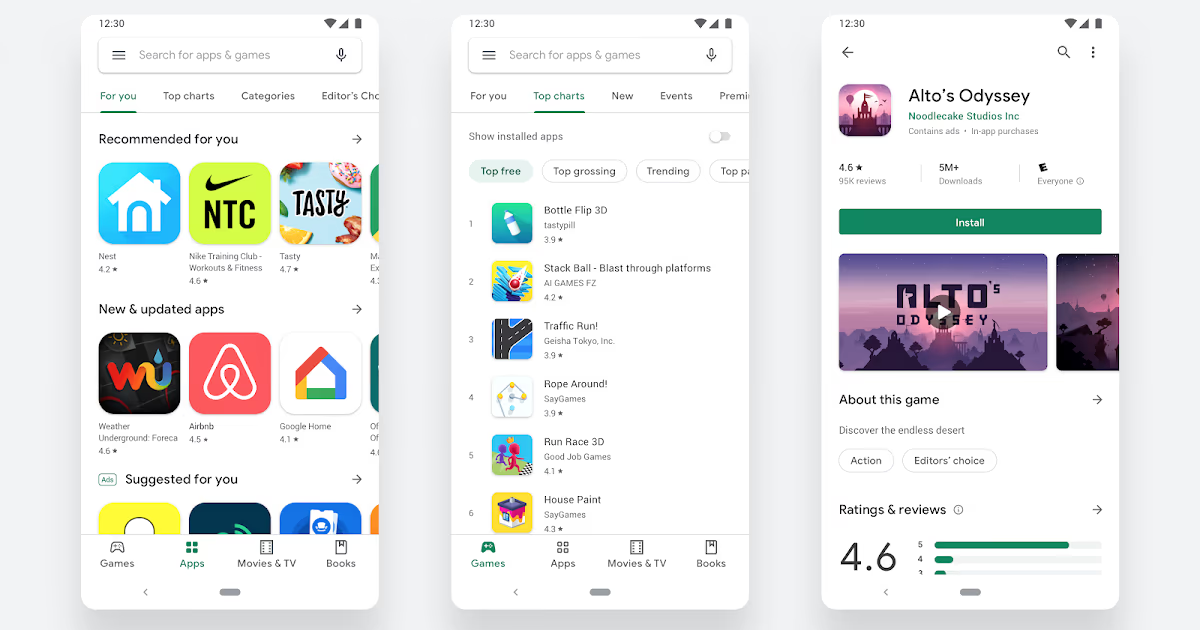
Screenshots are the first conversion lever, before the user even reads your description. On Google Play, they display horizontally in search results as a carousel. They are often the only thing the user sees before deciding.
Even so, most apps never touch them after launch.
Top games on Google Play test their screenshots up to 8 times a year [AT]. On non-gaming apps, 34% of top apps run at least two screenshot tests a year. That is free organic growth.
What your screenshots should show:
- The benefit, not the feature (show the result, not the interface)
- A real context of use
- A visual hierarchy that can be read in 2 seconds
💡 On Sticker Editor, an App Store screenshot redesign generated +20% conversion. The same lever exists on Google Play, and your competitors use it even less.
You can also add a preview video (30 seconds max). It is displayed first on the listing. Done well, it converts better than any screenshot. Done poorly, it hurts your image. Do not publish a video by default.
👉 To go further on optimizing your store listing: App Store ASO: ranking your mobile app
Rating and reviews: the signal Google cannot ignore
85% of apps featured on Google Play have a rating ≥ 4.0 [AT]. If you are below that, you are invisible on editorial surfaces, and penalized in the rankings.
A rating is not a passive outcome. It is built actively.
On Android, the right time to trigger a review request is after a positive action: a task completed, a goal reached, a successful session. Never on a cold launch, never in the middle of a critical flow.
Google Play offers the In-App Review API (the Android equivalent of SKStoreReviewController on iOS). It lets you trigger the review pop-up without leaving the app. Integrate it. Apps that do not leave rating points on the table.
On review management: reply to negative reviews within 48 hours. Google values developer engagement in its algorithm. A negative review handled well can be updated by the user, and a public reply shows future downloaders that you are responsive.
👉 To build your review volume from launch: How to get your first 100 App Store reviews
A/B testing in Google Play Console
It is one of Google Play's competitive advantages over the App Store: the native Store Listing Experiments in Google Play Console lets you natively test your icon, your screenshots, your short description, and your video, without a third-party tool.
How to use it:
- Go to "Store presence" → "Store listing experiments"
- Create a variant (icon A vs icon B, or screenshots version 1 vs version 2)
- Set the percentage of traffic exposed (50/50 recommended)
- Let it run for at least 7 to 14 days to reach statistical significance
What you can test: icon, feature graphic, screenshots, promo video, short description.
What you cannot test: the title (a direct change).
A common mistake: cutting the test too early because "it seems to be winning." Wait for statistical significance, otherwise you are optimizing for noise, not for signal.
Update frequency: what top apps do
The Google Play algorithm favors active apps. An app with no update for 6 months sends a stagnation signal, both to the algorithm and to users who look at the date of the last update.
Top non-gaming apps update their creatives 2 to 4 times a year. Top games go up to 8 times. That pace is not arbitrary. It follows A/B tests, seasons, new features, and shifts in the market.
What that means in concrete terms for your Google Play Store ranking :
- Plan at least 2 screenshot iterations a year
- Line up creative updates with new version releases
- Update the release notes (changelog) on every release. Users read them
The most common ASO mistakes on Android
Neglecting the long description
On Google Play, unlike the App Store, the long description is indexed by Google. Leaving keywords out of it means missing a free ranking lever.
Copy-pasting your App Store listing
The two stores follow different logics. What works visually on the App Store (vertical screenshots, portrait layout) does not transfer directly to Google Play's horizontal carousel. Adapt your creatives.
Ignoring involuntary churn
31% of subscription cancellations on Google Play are involuntary, caused by payment failures. It is not strictly an ASO problem, but it distorts the retention metrics Google uses in its ranking algorithm. Poor retention means a worse-ranked app. Integrate a billing-failure management solution from the start.
Never replying to reviews
Google values developer engagement. An app with no replies to reviews is read as abandoned, by the algorithm and by your future users.
Changing your icon too often
Most top apps have not changed their main icon since launch. Visual recognition is an asset. Do not sacrifice it for a passing graphic trend.
Your app deserves better than a rushed listing
Google Play Store ASO is free organic growth. Every lever left unused is traffic you hand to your competitors. firstapp builds store optimization into every project, at launch and over time.
Google Play ASO FAQ
What is the difference between App Store ASO and Google Play ASO?
Both stores share the same goals (being found, converting), but they differ on several key points. Google Play indexes the long description (4,000 characters), which the App Store does not. Google Play offers more complete native A/B testing. Screenshots display in a horizontal format on Google Play versus vertical on the App Store. Finally, Google's algorithm weighs retention and engagement signals more heavily in ranking.
How long does it take to see the effects of an ASO optimization on Google Play?
The effects of a Google Play ASO optimization generally show up between 2 and 6 weeks after the changes. Title and description changes can affect ranking within a few days. Screenshot changes affect conversion almost immediately. For an A/B test, allow at least 7 to 14 days before the data is usable.
Should you translate your Google Play listing for each market?
Yes, if you target several countries. Google Play lets you localize the title, the short description, the long description, and the screenshots by language. Localization directly affects your ranking in each local store - an English-language app on a French-speaking market is mechanically penalized. It is an underused lever for international growth.
How do you improve your Google Play rating quickly?
To improve a Google Play rating, three actions have an immediate impact: integrate the In-App Review API to trigger reviews at the right moment (after a positive action), reply to negative reviews within 48 hours to encourage edits, and fix the critical bugs flagged in reviews first. A rating that moves from 3.8 to 4.1 can shift your app onto editorial surfaces and create a snowball effect on organic downloads.
Also read
ASO App Store: the complete guide to ranking your app on the App Store in 2026
65% of App Store downloads start with a search. ASO covers keyword ranking and listing conversion, screenshots included.
App Store listing: how to optimize the page so it converts more
A user spends on average under 10 seconds on an App Store listing before deciding. They see the icon, the name, the rating, and the first two screenshots.
How does the Google Play Store ASO algorithm work?
The Google Play ASO algorithm takes several signals into account: keyword relevance in the title, the description, and the reviews, download volume and velocity, the average rating, the user retention rate, and in-app engagement. Unlike the App Store, Google also indexes the content of the long description, which makes it a ranking lever in its own right. A strong score on several of these signals combined is what gets you to the top of search results.