Passwordless sign-in for a mobile app: how do you do it?
70% of users abandon an app after the first try, often at sign-up. Without a password, identity goes through a code, a link, biometrics, or an Apple or Google account.


Article summary
- Without a password, identity goes through a temporary code, a magic link, biometrics, or an Apple or Google account.
- Email OTP sends a 6-digit code, valid for a few minutes and unusable a second time. The address is validated at sign-up.
- The magic link avoids typing but requires a deep link. Biometrics are available only after a first registration.
- Sign in with Apple removes all typing. Apple can hide the real email, which cuts off direct contact.
- A code that expires in 60 seconds is too short. The useful duration is 5 to 10 minutes, with a resend after 30 seconds minimum.
Summarize this article with
70% of users abandon an app after their first try. Often, they will never come back. Not because your product is bad. Because sign-up was too painful, and the password is one of the first causes.
firstapp has gradually dropped classic auth systems on its projects to move to passwordless sign-in. The result: less drop-off at sign-up, fewer support tickets, an email base validated from the start.
This guide explains how it works, why it converts better, and how to implement it on your mobile app.
What is passwordless sign-in?
The passwordless sign-in, also called passwordless authentication, covers every auth system that does not ask the user to create or enter a password.
Instead, identity is verified through:
- a temporary code sent by email or SMS (OTP)
- a magic link received by email
- the device's biometrics (Face ID, Touch ID)
- a third-party account (Sign in with Apple, Google)
The shared principle: the user memorizes nothing. They prove they control an email address, a number, or a device. That is enough.
This approach is taking over on mobile, notably because it removes friction at the most critical step of the journey: sign-up.
Newsletter
Once a week.
Last issue
We opened 10 apps to see how they sell a subscription.
+534 people read us each week
Why the password makes your users leave
The password creates two distinct problems, at two different moments in the journey.
At sign-up: the user has to invent a password. Often, they reuse the one from all their other accounts. Or they create a new one they will forget within the week. In both cases, you do not control the security quality of what they type.
On the way back: they no longer remember it. They click "forgot password". They wait for an email. They are redirected. They create a new password. At that point, a significant share of users abandon the flow, never to come back.
This is not a design problem. It is a structural problem: you ask your user for a cognitive effort to access something they do not know yet.
To go further on the mistakes that sabotage activation, read our article on classic mobile app creation mistakes.
How does email OTP work on a mobile app?
Email OTP (One-Time Password) is the passwordless sign-in method that is simplest to implement and the most universal.
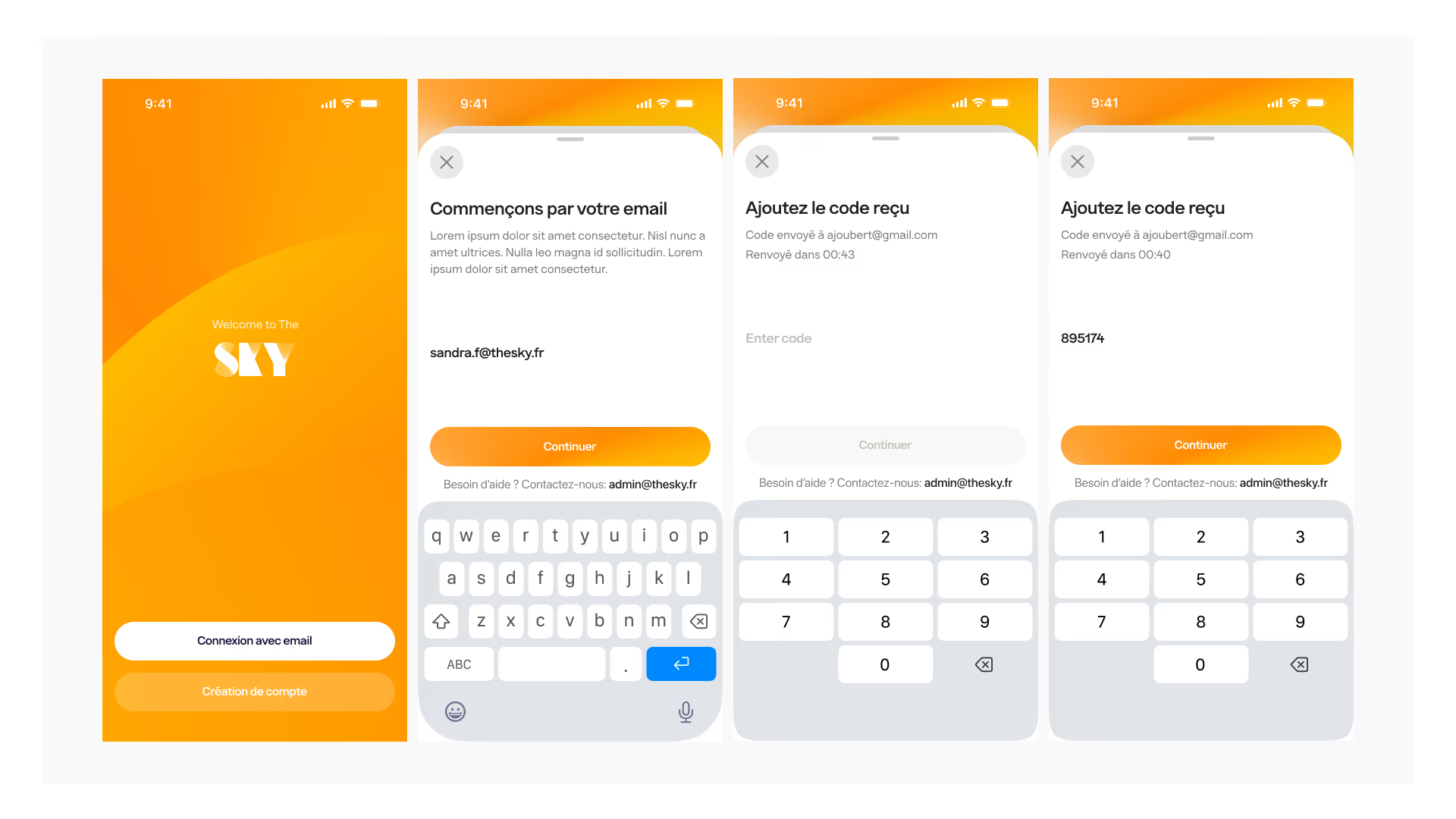
The full flow:
- The user enters their email address
- The app sends a 6-digit code to that address
- The user opens their email and gets the code
- They enter it in the app
- They are signed in, and their email is validated automatically
The code is valid for a few minutes, generated server-side, not guessable, and invalid after use. It is both simpler for the user and more secure than a weak password reused everywhere.
On the React Native projects firstapp builds, this is the system we implement by default when email authentication is needed.
Email OTP, magic link, biometrics: what is the difference?
Several approaches coexist. Here is how to tell them apart in concrete terms.
Email OTP
A 6-digit code sent by email, entered manually in the app. Simple, universal, compatible with every email client.
Ideal for consumer apps with fast onboarding.
Magic link
A clickable link sent by email. The user clicks and is signed in automatically. Even less friction than OTP, but it requires a deep link configured to open directly in the app, which makes implementation more complex.
Ideal for web-first apps with an associated mobile version.
Biometrics (Face ID / Touch ID)
Authentication through the device's native sensors. An ultra-fast experience. But it always requires a first registration (email or phone) before it can be turned on.
Ideal for apps with frequent sign-ins: finance, health, productivity.
Sign in with Apple / Google
The user signs in with their Apple or Google account. Zero password, zero typing. An excellent conversion rate - but you depend on a third-party platform, and Apple can hide the user's real email address.
Ideal for consumer apps targeting iOS first.
The benefits of passwordless sign-in
Adopting passwordless sign-in is not only a UX choice. It is a business choice.
Less drop-off at sign-up. Removing the "create a password" step cuts friction from the first screen. Users complete the flow more often.
A clean contact base from the start. With email OTP, the address is verified automatically at sign-up. No invalid addresses, no undetected typos.
Zero churn tied to lost access. No more "I can't sign in anymore". The user always has access to their email, so they always have access to their account.
Less inbound support. "Forgot password" or "account locked" tickets disappear. That time saving is significant as your user base grows.
Structurally better security. An OTP is valid for a few minutes and cannot be reused. That is more robust than a "123456" password shared across ten services.
To understand how sign-up fits into a broader activation strategy, see our guide on mobile onboarding optimization.
How to implement email OTP in a React Native app
Implementation is often faster than a classic auth system. Here are the options we use most on our projects.
With Supabase
Supabase offers native email OTP, with no extra configuration.
// Send the codeawait supabase.auth.signInWithOtp({ email })// Validate the code entered by the userawait supabase.auth.verifyOtp({ email, token, type: 'email' })A few lines of code. No custom backend to maintain.
With Expo
Expo integrates naturally with Supabase. Deep linking for magic links is also made easier by Expo Router if you choose that variant.
With Firebase
Firebase offers passwordless authentication via email link, documented and compatible with React Native through @react-native-firebase/auth. The approach differs slightly from OTP: it is a clickable link rather than a code to enter.
With a custom solution
If you prefer to keep control: generate and store OTPs server-side (Node.js + PostgreSQL or Redis), send the emails via Resend, SendGrid, or Postmark, and validate through your own API.
Heavier to maintain, but more flexibility on the security logic and the design of transactional emails.
Mistakes to avoid with an OTP
A few points to anticipate before you deploy.
Codes valid for too short a time. An OTP that expires in 60 seconds frustrates users who take time to open their inbox. Aim for 5 to 10 minutes.
No "Resend code" button. The email can land in spam. Always provide this option, with a wait of 30 seconds minimum to avoid abuse.
No visual feedback on sending. The user needs to know the email was sent, and to which address. A clear message reduces drop-off.
No fallback. If the user no longer has access to their email, what happens? Plan a recovery mechanism (a backup phone number, human support).
Poor email deliverability. An OTP that lands in spam is a useless OTP. Configure SPF, DKIM, and DMARC on your sending domain, and use a dedicated transactional sending service, never your homemade SMTP server.
FAQ
What is passwordless sign-in on mobile?
Passwordless sign-in on mobile is an authentication system that does not ask the user to create or memorize a password. Identity is verified another way: through a temporary code sent by email or SMS (OTP), a magic link, the device's biometrics (Face ID, Touch ID), or a third-party account (Apple, Google). This approach removes the main friction point at sign-up and mechanically eliminates forgotten-password problems.
Is email OTP secure for a mobile app?
Email OTP is considered more secure than a classic password in most cases. The code is generated randomly, valid for only a few minutes, and invalid after the first use. It cannot be reused, unlike a weak password shared across several services. Overall security then depends on the quality of your email sending infrastructure and your domain configuration (SPF, DKIM, DMARC).
Email OTP or Sign in with Apple: which should you choose?
Both remove the password, but they answer different needs. Sign in with Apple offers an experience with no typing at all, but Apple can hide the user's real email - which reduces your ability to contact them. Email OTP guarantees you a validated, usable email. On our projects at firstapp, we often implement both: Sign in with Apple as the fast option, email OTP as the alternative.
Does passwordless sign-in improve sign-up conversion?
Yes. Removing the "create a password" step cuts friction at sign-up, which generally translates into a better completion rate for the onboarding flow. Passwordless sign-in also eliminates churn tied to locked accounts or forgotten passwords, which mechanically improves short-term retention. It is a simple technical optimization, with a direct impact on activation metrics.
Also read
Mobile app onboarding: how to reach 20% conversion
77% of users abandon an app within the first 72 hours. Onboarding that converts shows the value before the email, the permissions, and the paywall.
Why your users refuse your iOS permissions
On iOS, a refused permission cannot be asked again, and fewer than 5% of users will go into Settings. Notifications go from under 20% opt-in when asked cold to 40 to 60% when the ask is prepared.
How do you implement email OTP in a React Native app?
The fastest method is to use Supabase, which handles email OTP natively in a few lines of code, with no custom backend. Firebase also offers a passwordless solution via email link, compatible with React Native. For projects that need more control, you can build a custom server-side system with Node.js and a transactional sending service such as Resend or SendGrid.