iOS Home Screen Quick Actions: intercept users before they delete your app
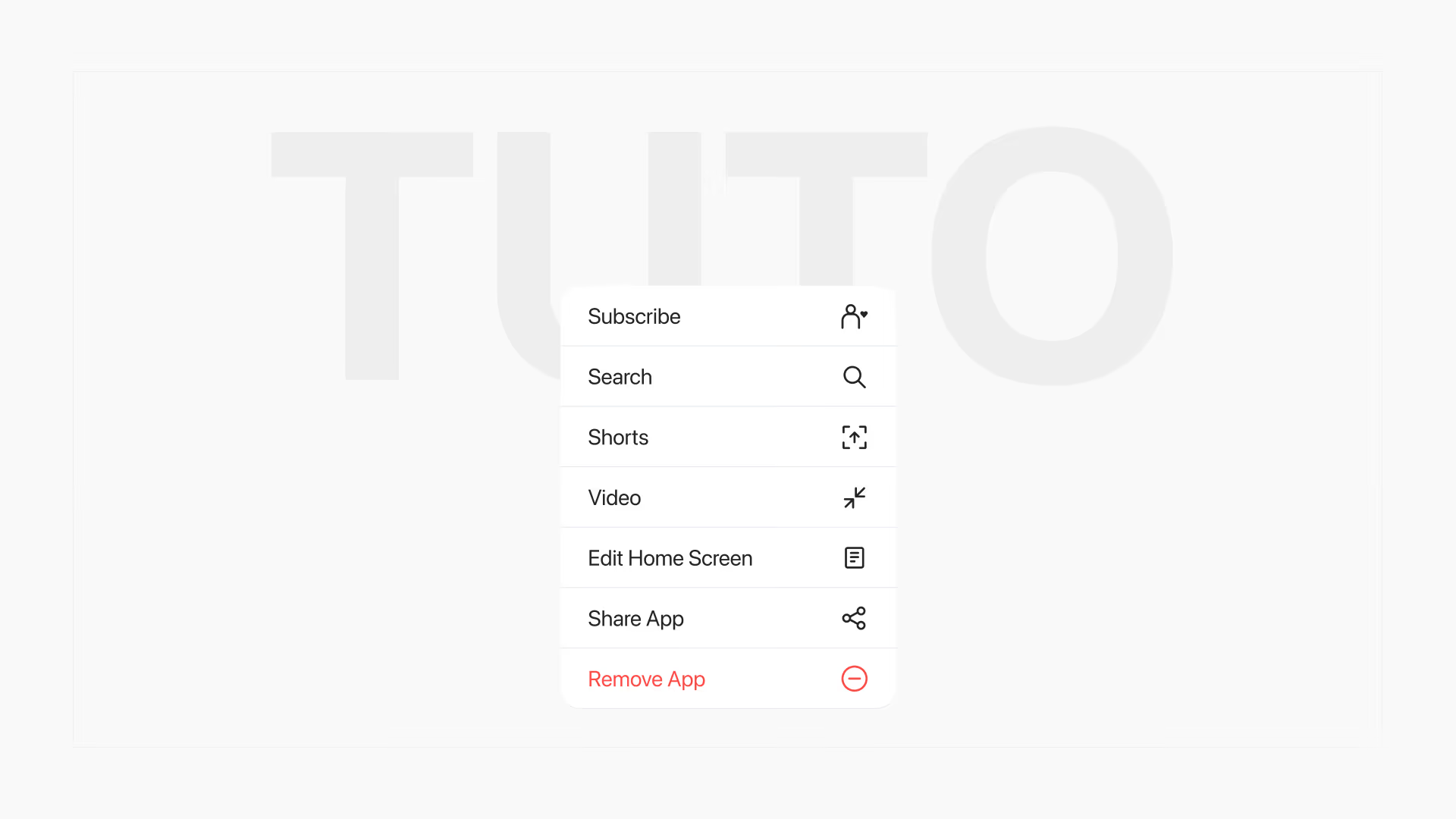
Since iOS 13, a long press on the icon opens a menu where you can add up to 4 actions, including a form before deletion. The same mechanic is implemented in React Native and in Swift.

Article summary
- Since iOS 13, a long press on the icon opens a context menu where the app can add up to 4 actions.
- An action like "Got a problem? Tell us." collects feedback from users who have already decided to delete the app.
- A Quick Action title fits in about 35 characters, the subtitle in about 45.
- The action does not prevent deletion: it shares the menu with "Delete App", and the user can leave without seeing it.
- Dynamic Quick Actions appear only after a first launch. On Android, the equivalent is the App Shortcut.
Summarize this article with
Most founders watch their users leave and do nothing. They see churn in their dashboards, but they never have the conversation that would explain why.
There is a native iOS mechanic, almost ignored, that lets you intercept a user at the exact moment they are about to delete your app. Not an intrusive popup. Not a win-back email sent three days too late. A conversation in the right place, at the right time.
Here is how to implement it, in React Native and in native Swift. This is the kind of mechanic firstapp builds in to turn churn into a product signal.
What Home Screen Quick Actions are
Since iOS 13, when a user long-presses an app icon, a context menu appears. By default, iOS shows "Share App" and "Delete App".
This menu is fully customizable. You can add up to 4 actions specific to your app, shortcuts that open directly onto a feature, a screen, or in our case, a form.
The idea is simple: you place an action titled "Got a problem? Tell us." in this menu. The user about to delete the app lands on it. Some of them tap. And you collect the most honest feedback there is, from a user who has nothing left to lose.
Newsletter
Once a week.
Last issue
We opened 10 apps to see how they sell a subscription.
+534 people read us each week
Why feedback before deletion is different
A user who fills in an in-app survey is still there. They still have goodwill toward your product. They will often tell you what they think you want to hear, or tap the fastest answer.
A user who deletes your app has made their decision. They have no reason to lie to you. They will tell you the real reason, the friction they never mentioned, the feature they were waiting for, the bug that made them leave.
This is the feedback you will not find anywhere else
Implementation in React Native (Expo)
Installation
The simplest solution for an Expo project is expo-quick-actions, maintained by Evan Bacon (Expo core team).
npx expo install expo-quick-actionsDefine the action in the menu
Add the Quick Actions at app startup, in your root layout or your App.tsx :
import * as QuickActions from "expo-quick-actions";
import { useEffect } from "react";

export default function RootLayout() {
  useEffect(() => {
    QuickActions.setItems([
      {
        id: "churn-feedback",
        title: "Got a problem? Tell us.",
        subtitle: "30 seconds. It really matters.",
        icon: "bubble.left", // SF Symbol iOS
      },
    ]);
  }, []);

  // ...
}
Note: On Android, the equivalent is called App Shortcuts. The same library handles them. The icon parameter accepts an Android drawable.Listen for the tap on the action
When the user taps your Quick Action, the app opens and you receive an event. Intercept it to redirect to your form :
import * as QuickActions from "expo-quick-actions";
import { useRouter } from "expo-router";
import { useEffect } from "react";

export default function RootLayout() {
  const router = useRouter();

  useEffect(() => {
    // Case where the app is already open in the background
    const subscription = QuickActions.addListener((action) => {
      if (action.id === "churn-feedback") {
        router.push("/feedback");
      }
    });

    return () => subscription.remove();
  }, []);

  useEffect(() => {
    // Case where the app is launched from the Quick Action (cold start)
    QuickActions.getInitialAction().then((action) => {
      if (action?.id === "churn-feedback") {
        router.push("/feedback");
      }
    });
  }, []);

  // ...
}
The feedback form
Keep it short. Three questions are enough:
// app/feedback.tsx
import { useState } from "react";
import { View, Text, TextInput, TouchableOpacity, StyleSheet } from "react-native";

const REASONS = [
  "The app did not meet my need",
  "Too expensive",
  "I found a better alternative",
  "Technical problem",
  "I don't use it enough anymore",
  "Other",
];

export default function FeedbackScreen() {
  const [source, setSource] = useState("");
  const [reason, setReason] = useState("");
  const [suggestion, setSuggestion] = useState("");
  const [submitted, setSubmitted] = useState(false);

  const handleSubmit = async () => {
    await fetch("https://votre-api.com/churn-feedback", {
      method: "POST",
      headers: { "Content-Type": "application/json" },
      body: JSON.stringify({ source, reason, suggestion }),
    });
    setSubmitted(true);
  };

  if (submitted) {
    return (
      <View style={styles.container}>
        <Text style={styles.title}>Thanks - noted.</Text>
        <Text style={styles.subtitle}>
          Your feedback goes straight into our product backlog.
        </Text>
      </View>
    );
  }

  return (
    <View style={styles.container}>
      <Text style={styles.title}>Before you go</Text>
      <Text style={styles.label}>How did you discover the app?</Text>
      <TextInput
        style={styles.input}
        value={source}
        onChangeText={setSource}
        placeholder="App Store, word of mouth, social..."
      />

      <Text style={styles.label}>Why are you leaving?</Text>
      {REASONS.map((r) => (
        <TouchableOpacity
          key={r}
          style={[styles.option, reason === r && styles.optionSelected]}
          onPress={() => setReason(r)}
        >
          <Text>{r}</Text>
        </TouchableOpacity>
      ))}

      <Text style={styles.label}>What could we have done better?</Text>
      <TextInput
        style={[styles.input, styles.textarea]}
        value={suggestion}
        onChangeText={setSuggestion}
        placeholder="Answer freely..."
        multiline
        numberOfLines={4}
      />

      <TouchableOpacity style={styles.button} onPress={handleSubmit}>
        <Text style={styles.buttonText}>Send</Text>
      </TouchableOpacity>
    </View>
  );
}

const styles = StyleSheet.create({
  container: { flex: 1, padding: 24, backgroundColor: "#fff" },
  title: { fontSize: 22, fontWeight: "700", marginBottom: 8 },
  subtitle: { fontSize: 15, color: "#666", marginTop: 8 },
  label: { fontSize: 15, fontWeight: "600", marginTop: 20, marginBottom: 8 },
  input: { borderWidth: 1, borderColor: "#ddd", borderRadius: 8, padding: 12 },
  textarea: { height: 100, textAlignVertical: "top" },
  option: { padding: 12, borderRadius: 8, borderWidth: 1, borderColor: "#ddd", marginBottom: 8 },
  optionSelected: { borderColor: "#000", backgroundColor: "#f5f5f5" },
  button: { backgroundColor: "#000", padding: 16, borderRadius: 8, marginTop: 24, alignItems: "center" },
  buttonText: { color: "#fff", fontWeight: "700", fontSize: 16 },
});
Native Swift implementation
For a Swift/UIKit app, Quick Actions are configured in the AppDelegate :
// AppDelegate.swift

func application(
  _ application: UIApplication,
  didFinishLaunchingWithOptions launchOptions: [UIApplication.LaunchOptionsKey: Any]?
) -> Bool {

  // Define the Quick Action
  let feedbackAction = UIApplicationShortcutItem(
    type: "com.votreapp.churn-feedback",
    localizedTitle: "Got a problem? Tell us.",
    localizedSubtitle: "30 seconds. It really matters.",
    icon: UIApplicationShortcutIcon(systemImageName: "bubble.left"),
    userInfo: nil
  )
  application.shortcutItems = [feedbackAction]

  // Handle the cold start case
  if let shortcutItem = launchOptions?[.shortcutItem] as? UIApplicationShortcutItem {
    handleShortcut(shortcutItem)
  }

  return true
}

// Handle the tap when the app is already open
func application(
  _ application: UIApplication,
  performActionFor shortcutItem: UIApplicationShortcutItem,
  completionHandler: @escaping (Bool) -> Void
) {
  handleShortcut(shortcutItem)
  completionHandler(true)
}

private func handleShortcut(_ shortcutItem: UIApplicationShortcutItem) {
  if shortcutItem.type == "com.votreapp.churn-feedback" {
    // Open the FeedbackViewController
    NotificationCenter.default.post(name: .openFeedback, object: nil)
  }
}
For SwiftUI, use the .onOpenURL modifier, or go through an @EnvironmentObject to trigger navigation from the action.
Wording for iOS Quick Actions
The title of your Quick Action is what the user reads first. It is your only chance.
Avoid:
- "Leave a review" → too administrative
- "Contact us" → perceived as support
- "Feedback" → too vague, too generic
What works:
- "Got a problem? Tell us." → empathy + an invitation
- "Before you go, 30 seconds?" → creates a pause in the gesture
- "Is something wrong?" → opens the conversation
The iOS limit is about 35 characters for the title and about 45 for the subtitle. Test several wordings.
Handling feedback responses
Collecting feedback with no process to act on it is useless. Here is a minimal setup:
- Send responses to a dedicated Slack channel. Each piece of feedback arrives in real time, visible to the whole team
- Tag by primary reason. You will see patterns emerge very quickly
- Reread every week, not once a quarter
- Act on the quick wins. If 40% of responses mention the same bug, that is your next fix
A user who takes 30 seconds to explain why they are leaving deserves a fix on your roadmap. That is the implicit contract of this mechanic.
Limits of Home Screen Quick Actions
- Maximum 4 Quick Actions per app, choose carefully which one to dedicate to feedback
- Android works differently. Android App Shortcuts also appear on a long press, but behavior can vary by launcher
- The action does not intercept deletion. It appears in the same menu, but the user can still delete directly without seeing it. This is not a block. It is an invitation
- The app must have been launched at least once for dynamic Quick Actions to appear
You have set up this mechanic and you want to know what the rest of your app tells your users before they leave? We audit your onboarding, your paywall, and your feedback loops, and we tell you exactly what makes people churn. Request an audit of my app!
FAQ
What are Home Screen Quick Actions for?
Since iOS 13, a long press on the icon opens a menu. You can add up to 4 actions. The use described here is an action like "Got a problem? Tell us.", to capture the reason for leaving at the moment the person is about to delete the app.
Does it prevent deletion?
No. The action appears in the same menu as "Delete App". The person can delete without seeing it. This is not a block. It is an invitation. Dynamic actions appear only after a first launch of the app.
What should you put in the form?
Three questions are enough. The action title is limited to about 35 characters, the subtitle to about 45. "Leave a review" and "Contact us" work less well than "Got a problem? Tell us." or "Before you go, 30 seconds?".
Does this exist on Android?
Yes, under the name App Shortcuts. The expo-quick-actions library handles them too, with a drawable icon. Behavior can vary by launcher. Responses are handled in a Slack channel, tagged by reason, and reread every week.
Also read
How do you reduce churn in a mobile app?
Cutting churn from 2% to 1% can double LTV. About 31% of Google Play cancellations are payment failures, versus 14% on iOS.
How to keep your users on a mobile app
25% of mobile apps are opened only once. The first session, those first 3 minutes, decides whether the user comes back at J+1.