Build a mobile app with Expo: the complete guide
Expo covers 95% of React Native use cases, camera, GPS, and notifications included, without writing native code. EAS Update deploys a JavaScript fix to production without going back through the stores.


Article summary
- With Expo, 95% of use cases are covered without writing native code.
- EAS Update pushes JavaScript fixes to production without a new store review.
- EAS Build compiles the iOS binary in the cloud, with no local Mac.
- Publishing on the App Store still requires an Apple Developer account at $99/year.
- Calyra (formerly Nutria) generated €30,000 in the first month with a single main feature.
Summarize this article with
90% of mobile apps that fail do not die from a technical problem. They die from an onboarding nobody finishes, a paywall nobody understands, an acquisition that costs too much. The technique is rarely the problem.
That is precisely why firstapp uses Expo on all of our projects. Not because it is the only tool that works, but because it solves the technical part quickly and cleanly, so we can put the energy where it really matters: the business of the app.
This guide explains what Expo does, how to build a mobile app with Expo from A to Z, and above all where most founders drop off when they try to do it alone.
Newsletter
Once a week.
Last issue
We opened 10 apps to see how they sell a subscription.
+534 people read us each week
What Expo is, and why it is our stack at firstapp
React Native without the native complexity
Expo is a set of tools and services that simplifies mobile app development in React Native. Concretely: you write JavaScript/TypeScript, Expo handles everything that touches native iOS and Android code.
Without Expo, developing in React Native means configuring Xcode for iOS, Android Studio for Android, managing native dependencies that are incompatible with each other, and debugging errors that have nothing to do with your app logic. That is time lost for a founder.
With Expo, 95% of use cases are covered natively - camera, geolocation, push notifications, biometrics, storage - without touching a line of native code. One codebase for iOS, Android, and even web if needed.
Why we made this choice at firstapp
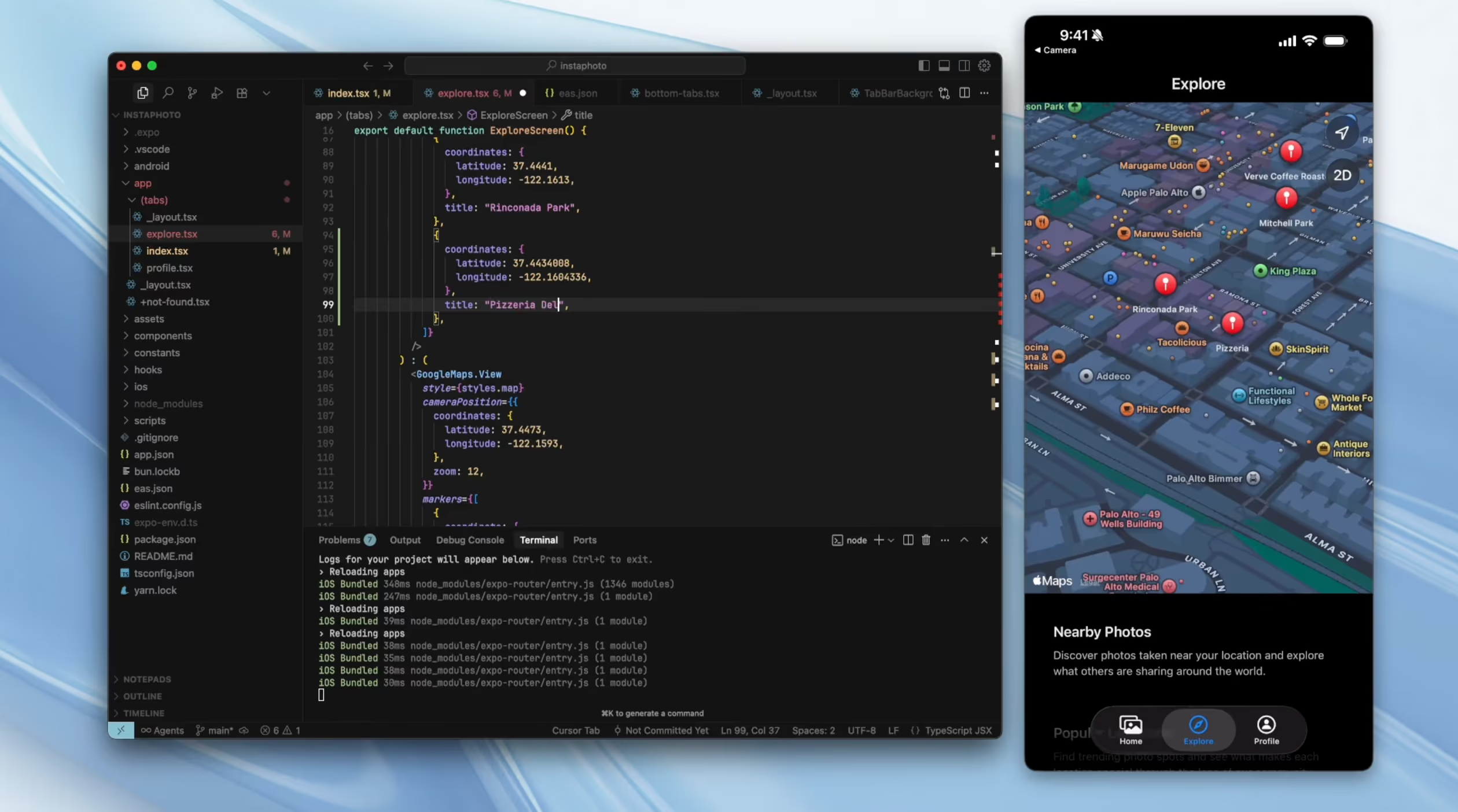
At firstapp, we have used Expo on every project from the start. Not out of habit, out of conviction. Expo Router for navigation, EAS for the build and deployment, EAS Update for production fixes without going back through the stores.
That last point changes everything for our clients. When Jam Solidaire needed a critical fix in production, we deployed it in a few minutes without waiting 24 to 48 hours of Apple review. For a donation-collection app with 15,000 active donors, that kind of agility has a direct value on revenue.
What Expo makes possible that other tools do not
A real native app, not a web app
This is the fundamental difference with Lovable, Bolt, or any vibe-coding tool. A React Native app with Expo is a native app. It is downloaded from the App Store or Google Play. It installs on the phone. It sends push notifications. It uses the camera, GPS, Bluetooth, Face ID.
Your users do not see a web page in a browser. They see an app that behaves like every other app on their phone, because it is one.
EAS Update: fix in production without the stores
This is the advantage we cite first to our clients. EAS Update lets you push JavaScript fixes directly into your app in production, without submitting a new version to the stores and waiting for their validation.
For critical bugs, text fixes, interface adjustments: you deploy in a few minutes. For changes that touch native code (new permissions, a new SDK), you have to go back through the stores, but those cases are rare.
Info: According to Expo data, teams that use EAS Update reduce their average production-fix time from 48 hours to under 15 minutes.
One codebase for iOS and Android
Building two separate apps, one in Swift for iOS, one in Kotlin for Android, means a development budget that is almost doubled. Expo and React Native give you one codebase that compiles for both platforms. A few adjustments specific to each OS exist, but they stay marginal.
Create your first app with Expo: where to start
The technical prerequisites
Building a mobile app with Expo requires a minimum of technical background. If you have never touched JavaScript or React, Expo will not be your entry point. Look first at Bolt and its Expo integration to prototype, then come back here for the production version.
If you have some JavaScript basics, here is what you need:
- Node.js installed on your machine
- A code editor (VS Code recommended)
- The Expo Go app on your phone to test
- An Expo account (free)
Initialize your project
The starting command is simple:
npx create-expo-app@latest my-app
cd my-app
npx expo start
Expo starts a development server. Scan the QR code with the Expo Go app on your phone, your app opens in real time, with automatic reload on every code change.
This is Expo's most "magical" moment: you change a line, your phone updates in seconds. No compilation, no waiting.
Choose your navigation structure
Expo Router has been the official navigation system since Expo SDK 49. It works like Next.js for the web: each file in the app/ folder automatically becomes a screen. This is the structure we use at firstapp on all our projects: clear, scalable, easy to maintain.
Publish on the App Store and Google Play with EAS
EAS Build: compile without a Mac for iOS
This has historically been the number-one blocker for React Native developers: compiling an iOS app requires a Mac with Xcode. EAS Build solves this by compiling your binaries in the cloud.
You run eas build --platform ios, EAS handles the compilation on its servers, and you get back a file .ipa ready to submit. Same thing for Android with an .aab.
The unavoidable prerequisite remains an Apple Developer account at $99/year to publish on the App Store. There is no workaround. It is Apple's rule, with no exception.
EAS Submit: automated submission
Once your binaries are compiled, EAS Submit automates submission to the stores. You configure your credentials once, and EAS handles the rest: upload, metadata, screenshots.
Apple review generally takes between 24 and 48 hours for a first submission. Later updates are often validated faster if your history is clean.
What actually happens during Apple review
Apple systematically checks several points: the permissions requested (justify every camera, GPS, and contacts access), the legal mentions (terms of use and a privacy policy are mandatory), the behavior of the paywall if you have one, and the general quality of the experience.
A poorly built paywall or unjustified permissions are the two most frequent causes of rejection. Our article on mobile paywall optimization details the Apple rules to follow to pass review without a hitch.
The mistakes founders make with Expo
Starting too big too fast
Expo lets you build fast. Too fast, sometimes. Founders spend weeks implementing advanced features before they have had a single real user. The rule we apply at firstapp: the main feature has to work perfectly before you add a second one.
Calyra (formerly Nutria), a nutrition app we worked with, generated €30,000 in revenue in the first month with a single main feature well executed. Not ten average features. One remarkable feature.
Ignoring Apple guidelines until the rejection
Apple guidelines are not optional. Many founders discover them for the first time during a review rejection, after weeks of development. The points that systematically get an app rejected: unclear use of permissions, a paywall that does not follow In-App Purchase rules, no privacy policy, or an app that is too "basic" with no clear added value.
Warning: Apple rejects about 40% of new apps on the first submission. Anticipating the guidelines from the development phase saves you weeks of delay.
Onboarding, paywall, ASO: what Expo will never do for you
The onboarding the code does not decide
Expo gives you the tools to build any onboarding. But deciding which information to ask for, in which order, with which message, at which moment to show the value of your app: no framework does that for you.
Sticker Editor increased its conversion rate by 20% after an onboarding redesign. The code did not change in depth. The logic of the path did. Less friction at the start, more immediate perceived value, a better-targeted activation moment. This work is product expertise, not technical expertise.
Our guide on mobile onboarding optimization details the principles that apply to every app, whatever the technical stack.
The paywall nobody optimizes
Expo integrates react-native-purchases from RevenueCat perfectly, to manage iOS and Android subscriptions from a single API. The technical setup is documented and relatively simple.
What is complicated is everything else: the right price, the right offer structure, the right moment in the path to present the paywall, the right reassurance elements to show. According to RevenueCat State of Subscription Apps 2026, apps in the top 25% of their category convert 4 times more than the median, for the same technical quality. The difference is in the strategy, not in the code.
The ASO you forget until launch
Your app is on the App Store. Now, how will future users find it? App Store Optimization - the title, the subtitle, the keywords, the screenshots, the ratings - represents between 30% and 60% of organic downloads for most apps. It is a discipline of its own, independent of Expo and React Native.
See our complete guide on App Store ASO to understand how to optimize your presence on the stores from day one.
Expo and vibe-coding tools: how to combine the two
The sequence that works
We see it more and more with our clients: Bolt to prototype and validate, Expo to build the production version. This is not a random sequence. It is a method.
Bolt gives you a working web prototype in a few hours. You test it, you collect data, you validate that the concept holds. Then, with those lessons, you build the real React Native app with Expo, knowing exactly which features are priorities and which can wait.
The Bolt prototype does not become the Expo app. It becomes the functional specification validated by real users. That is its real role.
What Expo brings that Bolt cannot give
An Expo app published on the App Store benefits from the stores' organic distribution, native push notifications, full access to hardware features, and the trust effect users have toward a downloaded app, rather than a web link. These differences have a direct impact on acquisition, retention, and revenue.
When to call firstapp rather than continue alone
Expo is accessible to founders who have JavaScript basics. Up to a point.
The signals that it is time to get support: EAS configuration and Apple certificates cost you several days, your app is rejected in review without you understanding why, your D7 retention rate is below 20% and you do not know how to improve it, or you are ready to invest in growth but you do not know where to start.
At firstapp, Expo is our daily work. All our projects run on it, Jam Solidaire, Calyra (formerly Nutria), Sticker Editor, Mukiz with its 250,000 monthly active users. We handle the full cycle: React Native development, EAS configuration, store submission, and everything that makes an app take off after launch - onboarding, paywall, ASO, retention.
If you have a project underway or an idea to build, let us talk about it directly. Talk about your project
Conclusion: Expo as the foundation, the business as the priority
Expo is the best tool available today for building a serious React Native app. It solves the technical complexity of cross-platform mobile development, and it does it well. That is why we use it on all our projects at firstapp.
But a mobile app with Expo that converts and retains its users is not only a question of technical stack. It is a question of product and business decisions made at the right moment: the right onboarding, the right paywall, the right ASO strategy, the right approach to retention.
Those decisions, no framework makes them for you.
FAQ on Expo
Is Expo free for building a mobile app?
Expo is free for development and local testing via Expo Go. EAS Build, the service that compiles your iOS and Android binaries in the cloud, offers a free plan with a limited number of monthly builds, enough to start. Paid plans start at $29/month for higher volumes. On top of that: the Apple Developer account at €99/year, required to publish on the App Store, and the Google Play Developer account at €25 (one-time payment) for Android.
Do you need to know how to code to use Expo?
Yes. Expo simplifies React Native development but does not replace it. You need JavaScript basics, and ideally React, to use Expo effectively. If you do not have those basics, tools like Bolt with its Expo integration let you generate a first version through prompts, but for a robust production app, technical skills remain necessary, or you need a team around you.
What is the difference between Expo and React Native?
React Native is the base framework, developed by Meta, that lets you create mobile apps in JavaScript. Expo is a layer that simplifies React Native: it adds an SDK with native APIs ready to use (camera, GPS, notifications), build and deployment tools (EAS), and a navigation system (Expo Router). Almost every React Native project in 2026 uses Expo. It has become the de facto standard.
How long does it take to build an app with Expo?
A working MVP can be developed in 4 to 8 weeks with an experienced team, depending on feature complexity. Timelines stretch if the app needs complex integrations, real-time features, or specific algorithms. Apple review adds 1 to 3 extra days for the first publication. At firstapp, creation is scoped on request.
Can you update an Expo app without going back through the App Store?
Yes, that is one of the major advantages of EAS Update. Changes that only touch JavaScript code - bug fixes, interface adjustments, new text - can be pushed straight to production in a few minutes, with no Apple or Google validation. Changes that modify native code (new permissions, a new native module), on the other hand, require a new submission to the stores. In practice, the majority of routine updates go through EAS Update.
Does Expo let you publish on the App Store and Google Play at the same time?
Yes. Expo and React Native share one codebase for iOS and Android. EAS Build compiles the binaries for both platforms from the same code. EAS Submit automates submission to the App Store and Google Play. There can be slight behavior differences between iOS and Android on some native features, but they stay marginal on the great majority of use cases.
Also read

React Native or Flutter in 2026: a comparison for startups
React Native apps show 2.5% D35 conversion, against 2.0% for native and 1.8% for Flutter. Revenue per install at 14 days follows: $0.34, $0.22, and $0.19.
Web app or native mobile app: how to choose in 2026?
Less than 6% of time spent on a smartphone is spent in a browser, and more than 94% in applications, according to Sensor Tower (State of Mobile 2026).